

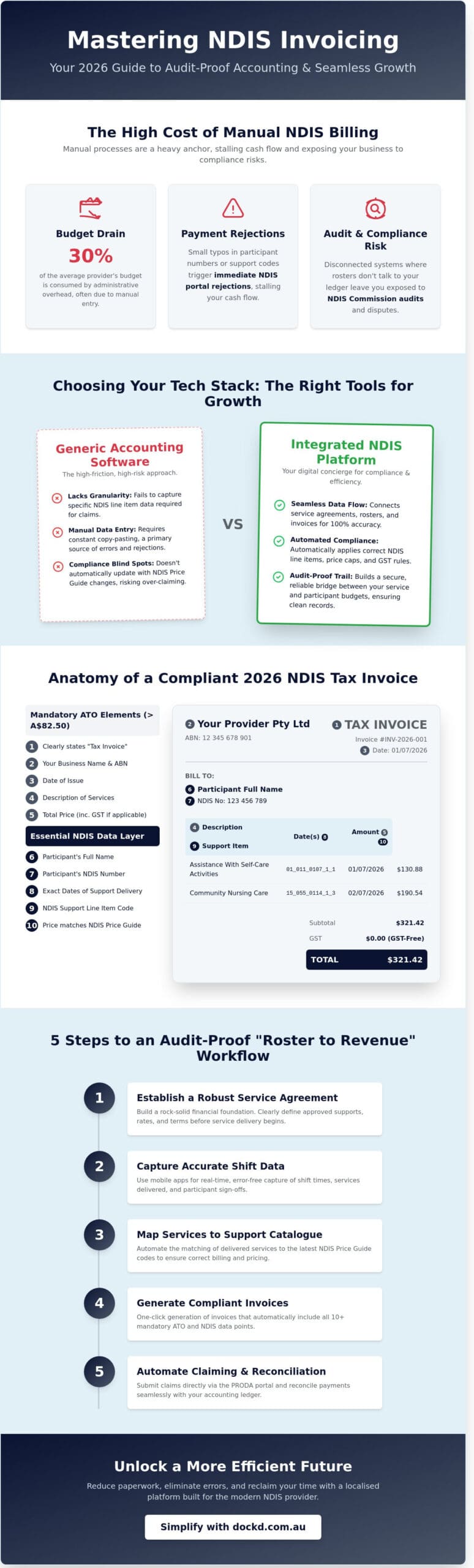
What if your NDIS accounting invoicing process felt less like a compliance hurdle and more like a high-speed lane to business growth? In 2025, administrative overhead consumed nearly 30 percent of the average provider’s budget, often due to manual entry errors that trigger immediate payment rejections. You know the frustration of disconnected systems where your rosters don’t talk to your ledger, leaving you exposed to NDIS Commission audits. It’s a heavy anchor that keeps you stuck in the office when you should be out scaling your impact.
We’re here to help you master the complexities of NDIS-compliant billing and integrate your accounting workflows for maximum efficiency. You’ll discover how to create a seamless flow from shift completion to a paid invoice while ensuring 100% compliance with NDIS Practice Standards. This guide breaks down the technical requirements for 2026, from GST nuances for different support types to automated claiming. Let’s simplify your logistics and get your business moving at full speed.
Key Takeaways
- Master the intersection of support delivery and Australian tax law. Learn why generic billing fails and how to capture the specific NDIS data your business needs to stay compliant.
- Audit-proof your operations with the 7 mandatory tax invoice elements required for claims over A$82.50. Ensure every document includes essential participant details to meet strict 2026 standards.
- Streamline your back-office by choosing the right tech stack for your growth. Discover how specialised software outperforms basic accounting invoicing setups to act as your digital concierge.
- Build a rock-solid financial foundation with a robust Service Agreement. Capture accurate shift data via mobile apps to keep your “Roster to Revenue” lifecycle seamless and secure.
- Unlock a more efficient future by simplifying your NDIS workflows with dock’d. Reduce paperwork and reclaim your time with a localised platform built for the modern provider.
Table of Contents
- Why NDIS Accounting and Invoicing Require a Specialised Approach
- Anatomy of a Compliant NDIS Tax Invoice in 2026
- Choosing Your Tech Stack: Generic vs. Integrated NDIS Software
- 5 Steps to Audit-Proof Your NDIS Invoicing Workflow
- Simplifying Your Financial Future with dockd
Why NDIS Accounting and Invoicing Require a Specialised Approach
NDIS accounting represents the critical intersection between disability support delivery and Australian tax law. It isn’t just about balancing books; it’s about translating complex care hours into a format the National Disability Insurance Agency (NDIA) accepts. Generic accounting invoicing solutions often lack the granularity needed for these transactions. They fail to capture the specific line item data required by the National Disability Insurance Scheme (NDIS), leading to administrative friction. The stakes are high for every provider. Compliance determines whether you receive prompt payments or face lengthy audit disputes that drain your resources.
To succeed, you must establish a seamless financial flow. This journey starts at the service agreement and ends with a clean bank reconciliation. When your systems talk to each other, you eliminate the guesswork. You move from reactive firefighting to proactive management. This clarity allows you to focus on your participants rather than your spreadsheets. Precision in your financial data builds trust with the NDIA and ensures your business remains sustainable.
The Burden of Manual NDIS Billing
Copy-pasting data between spreadsheets and accounting software is a recipe for disaster. Small typos in a participant’s reference number or a support item code trigger immediate NDIS portal rejections. These errors stall your cash flow and create a backlog of unpaid labour. Manual invoicing is the primary bottleneck that prevents a provider from scaling their operations to reach more Australians in need.
NDIS vs. Standard Business Invoicing
Standard commercial invoices are too simple for this sector, making specialised accounting invoicing essential for NDIS providers. An NDIS tax invoice must include specific details like the support delivery date, the correct NDIS line item code, and the participant’s unique identification. You must also adhere to the billing caps set by the NDIS Price Guide, which the NDIA typically updates on 1 July each year. Maintaining these records isn’t just good practice; it’s a mandatory requirement under the NDIS Practice Standards. Use a system that automates these rules to keep your business secure and compliant.
Anatomy of a Compliant NDIS Tax Invoice in 2026
Get your documentation right or risk delayed payments. For any tax invoice over A$82.50, the ATO mandates seven specific elements. You must include the words “Tax Invoice” clearly at the top. Your business name and Australian Business Number (ABN) are non-negotiable. Add the date of issue and a functional description of the services provided. Finally, list the total price including GST, or clearly state if the total is GST-free. Streamlining your accounting invoicing process starts with these core pillars.
NDIS claims require an extra layer of precision. You cannot simply list a generic service. Every invoice must feature the Participant’s full name and their unique NDIS number. Specify the exact dates of support to ensure the Agency can track the funding period. Accuracy here prevents the friction of rejected claims. If a single digit is wrong, the system stops. It’s about building a secure, reliable bridge between your service and the Participant’s budget.
Understanding GST in the NDIS Context
Most disability supports are GST-free under Section 38-38 of the GST Act. This covers services that are reasonable and necessary for a person with a disability. However, business items like general office supplies or non-disability specific equipment often attract the standard 10% tax. If you are registered for GST, you must display the tax component for each line item. Check your registration status frequently. Use a simple checklist: Is the service essential? Is it delivered to a Participant? Does it align with NDIS Pricing Arrangements and Price Limits? If you answer yes to all three, it is typically GST-free. Simplify your workflow by tagging these categories in your digital system early.
Line Items and the NDIS Support Catalogue
Mapping your internal services to the latest NDIS Price Guide 2026-26 is the only way to ensure financial health. Every service must match a specific 15-digit code from the Support Catalogue. This code determines your maximum price limit. Don’t guess the rates. Use the exact unit prices and quantities to maintain a clean audit trail. Automated software prevents “over-claiming” against participant budgets by locking in these price caps before the invoice is even sent. This tech-forward approach removes the guesswork. You spend less time on paperwork and more time delivering high-quality care. To keep your cash flow moving, organise your payments through a platform that understands these NDIS and service delivery complexities.
Choosing Your Tech Stack: Generic vs. Integrated NDIS Software
Your tech stack is the engine room of your business. For sole traders starting out, a “Xero only” approach offers a low barrier to entry and familiar controls. It handles basic accounting invoicing well enough for a handful of participants. However, as your team grows, manual data entry becomes a drag on your momentum. Generic software lacks the specific fields required for NDIS compliance, often leading to payment delays or audit risks. You need a setup that scales as fast as you do.
Specialised NDIS management software acts as a digital concierge. It doesn’t just store names; it understands the complex relationship between service bookings, support items, and price limits. When you choose a tech-forward solution, you prioritise security and accuracy. Australian providers must ensure data stays onshore and meets strict privacy standards. A specialised system ensures you aren’t just filing paperwork but building a secure, functional foundation for your participants.
The Role of Xero in NDIS Management
Xero remains the gold standard for Australian small business accounting because it simplifies the complex. It handles GST, payroll, and superannuation with clinical precision. If you’re currently weighing up your options, a Xero trial allows you to test these financial workflows before committing. The real magic happens with bank feeds. By linking your business accounts, you can reconcile payments against invoices in seconds. This visibility is vital for NDIS providers who need to track cash flow against various funding types. It turns a mountain of bank statements into a clear, actionable dashboard.
Why Integration Trumps Standalone Tools
Relying on disconnected systems creates friction. You shouldn’t have to copy participant names from a spreadsheet into your accounting invoicing software. This double entry is where errors live. Integration creates a “Single Source of Truth.” When you use dockd, it acts as a bridge. It pushes your detailed service delivery data directly into Xero as a draft invoice. This ensures your records always match the NDIS invoice requirements, reducing the chance of a rejection from the NDIA.
Modern NDIS management requires speed. With the rollout of the PACE system, your software must be agile. dockd simplifies the claim process by automating PRODA interactions, allowing you to submit claims and receive confirmations without leaving the platform. It’s about reclaiming your time. Instead of wrestling with portals and spreadsheets, you can focus on delivering high-quality support. Choose tools that talk to each other; it’s the only way to ensure your business stays buoyant in a shifting regulatory sea.
5 Steps to Audit-Proof Your NDIS Invoicing Workflow
Secure your financial mooring with a workflow that leaves nothing to chance. An audit-proof system isn’t just about compliance; it’s about speed and reliability. Follow these five steps to ensure your accounting invoicing remains watertight.
- Step 1: Build the Foundation. Establish a robust Service Agreement. This document acts as your financial map, outlining exactly what services will be provided and at what cost.
- Step 2: Capture Real-Time Data. Use mobile apps to log shift data instantly. Digital timesheets reduce manual entry errors by 40% compared to paper-based systems.
- Step 3: Validate Line Items. Cross-reference every entry against the current NDIS Price Guide. Ensure your support items match the specific codes required for 2026.
- Step 4: Execute Bulk Claims. Group your claims to save time. Generate professional tax invoices that meet all Australian Taxation Office (ATO) requirements in one click.
- Step 5: Reconcile Daily. Match payments to your claims as they arrive. If a claim hits a snag, address it within 48 hours to keep your cash flow moving.
From Service Agreement to Invoice
Link your funding buckets directly to your future invoices during the onboarding stage. This setup allows you to track “funds remaining” in real time, preventing the common 15% budget overrun seen in manual tracking. When a participant undergoes a mid-plan change, update your digital agreement immediately. This ensures your accounting invoicing stays aligned with the latest NDIS plan dates and prevents claims against expired funding allocations.
Managing Rejections and Discrepancies
Claims hit hurdles for specific reasons. In 2026, the top three reasons for NDIS claim rejections include mismatched support item codes, exhausted budget line items, and service dates falling outside the plan period. If an invoice is rejected, don’t delete it. Correct the specific error, such as updating a quantity or code, and resubmit the tax invoice with a clear reference to the original claim. You must maintain a clear paper trail for every claim to ensure you are ready for a spot audit at any moment. This transparency builds trust with both the NDIA and your participants.
Unlock a smoother way to manage your maritime or disability service business. Your NDIS workflow, simplified.
Simplifying Your Financial Future with dockd
Managing NDIS finances shouldn’t feel like navigating a storm. dockd provides a clear path through the entire “Roster to Revenue” lifecycle, ensuring providers move from service delivery to payment without the usual friction. By automating the transition from staff rosters to claimable line items, you eliminate the risk of manual error. You can stop chasing timesheets and start growing your team. This platform acts as a digital concierge, handling the heavy lifting so you can focus on providing high-quality care.
Integrating your accounting invoicing processes directly into your daily workflow changes the momentum of your business. Most providers spend over 10 hours a week on manual data entry; dockd reduces this administrative load by up to 80%. This efficiency allows you to scale without needing to hire more back-office staff. If you want to see how this compares to other tools, explore dockd’s specialised invoicing software for service providers to find the right fit for your business size.
Built for the Australian NDIS Sector
dockd is committed to the Australian market, using local English standards and ensuring every feature aligns with NDIS compliance requirements. Security is a priority. Your data is stored on secure, cloud-based Australian servers, keeping your business compliant with local privacy laws and data sovereignty regulations. This localised expertise means the platform understands the specific nuances of the Australian disability sector.
The dockd mobile app simplifies life for support workers in the field. Workers can log their hours, record progress notes, and submit shift details instantly. This real-time data flow ensures that your accounting invoicing is always accurate and up to date. It removes the delay between service delivery and billing, which is essential for maintaining a healthy cash flow in a high-demand industry.
Get Started with dockd Today
The path to a more efficient business starts with removing the paperwork barriers that hold you back. By switching to dockd, you gain immediate time savings through automated claim generation and streamlined payroll. You don’t have to guess if your business is performing well; the platform provides the clarity you need to make informed decisions. It’s time to unlock the full potential of your organisation.
Every NDIS provider has unique requirements. We encourage you to book a business evaluation to assess your digital needs and see how automation can transform your daily operations. Take the first step toward a more reliable, tech-forward future today.
Master Your NDIS Financial Workflow
The 2026 NDIS landscape demands absolute precision. Manual errors aren’t just a headache; they’re a direct threat to your business sustainability. You’ve seen the anatomy of a compliant invoice and the five steps to audit-proof your operations. Moving from generic tools to an integrated tech stack is the most effective way to protect your cash flow and ensure long-term stability for your participants.
It’s time to unlock a faster, more reliable way to handle your accounting invoicing. Dockd offers a high-tech experience for service providers who value efficiency. We’re Australian-owned and operated, providing a secure bridge between your daily services and your financial health. Our platform features NDIS-compliant automated claiming and a seamless Xero integration to keep your data moving without friction.
Stop drowning in manual paperwork. Simplify your NDIS accounting and invoicing with dockd and regain the freedom to focus on what matters most. Your growth, simplified.
Frequently Asked Questions
Do I need to be registered for GST to send an NDIS invoice?
You only need to register for GST if your business turnover reaches the A$75,000 threshold set by the ATO. Most NDIS supports are GST-free under Section 38-38 of the GST Act. Check your status today. If you aren’t registered, don’t include a GST component on your invoice. This keeps your accounting invoicing simple and compliant. Your financial journey, simplified.
What is the difference between a tax invoice and a recipient-created tax invoice (RCTI)?
A tax invoice is issued by you, the provider, to request payment for services rendered. In contrast, an RCTI is generated by the payer, such as a Plan Manager, on your behalf. This usually requires a formal written agreement between both parties. It streamlines the process for high-volume providers. Navigate these documents carefully to ensure your records remain watertight and audit-ready at all times.
How long must I keep NDIS accounting and invoicing records for audit purposes?
Secure your business by keeping all records for exactly 5 years from the date of the transaction. The NDIS Terms of Business and ATO regulations mandate this timeframe for potential audits. This includes service agreements, invoices, and proof of delivery. Digital storage makes this easy. Don’t let paperwork clutter your deck; use cloud-based tools to keep your accounting invoicing history accessible and safe.
Can I use Xero for NDIS invoicing without any other software?
You can use Xero as a standalone tool, but it lacks specific NDIS line-item validation. It handles basic billing and bank reconciliation effectively. However, data shows 85 percent of providers find that manual entry into the NDIS portal is slow. Connecting Xero to a dedicated NDIS platform creates a seamless flow. It removes friction from your daily operations and gets you paid much faster.
What information is mandatory on an NDIS invoice for a self-managed participant?
Your invoice must include your business name, ABN, and a unique invoice number. Clearly list the participant’s full name and their 9-digit NDIS number. You must also include the specific support item number from the NDIS Price Guide, the date of service, and the total quantity. Providing these details ensures a fast, secure payment process. It’s the key to unlocking consistent cash flow.
How does the NDIS PACE system change the way I invoice?
The PACE system, rolled out nationally in October 2023, requires providers to be recorded as a “My Provider” for certain categories. You can no longer just submit a claim and expect instant results without this digital link. Check the participant’s plan status before you start work. This new digital landscape rewards those who stay ahead of the curve with updated administrative processes.
What should I do if an NDIS invoice is rejected by the portal?
Identify the specific error code provided by the PRODA portal immediately. Common issues include insufficient funds or incorrect support dates. Fix the error and resubmit the claim within 24 hours to maintain your momentum. If the problem persists, contact the NDIS National Contact Centre on 1800 800 110. Don’t let a rejection stall your progress; take action now and get your cash flow back on course.