

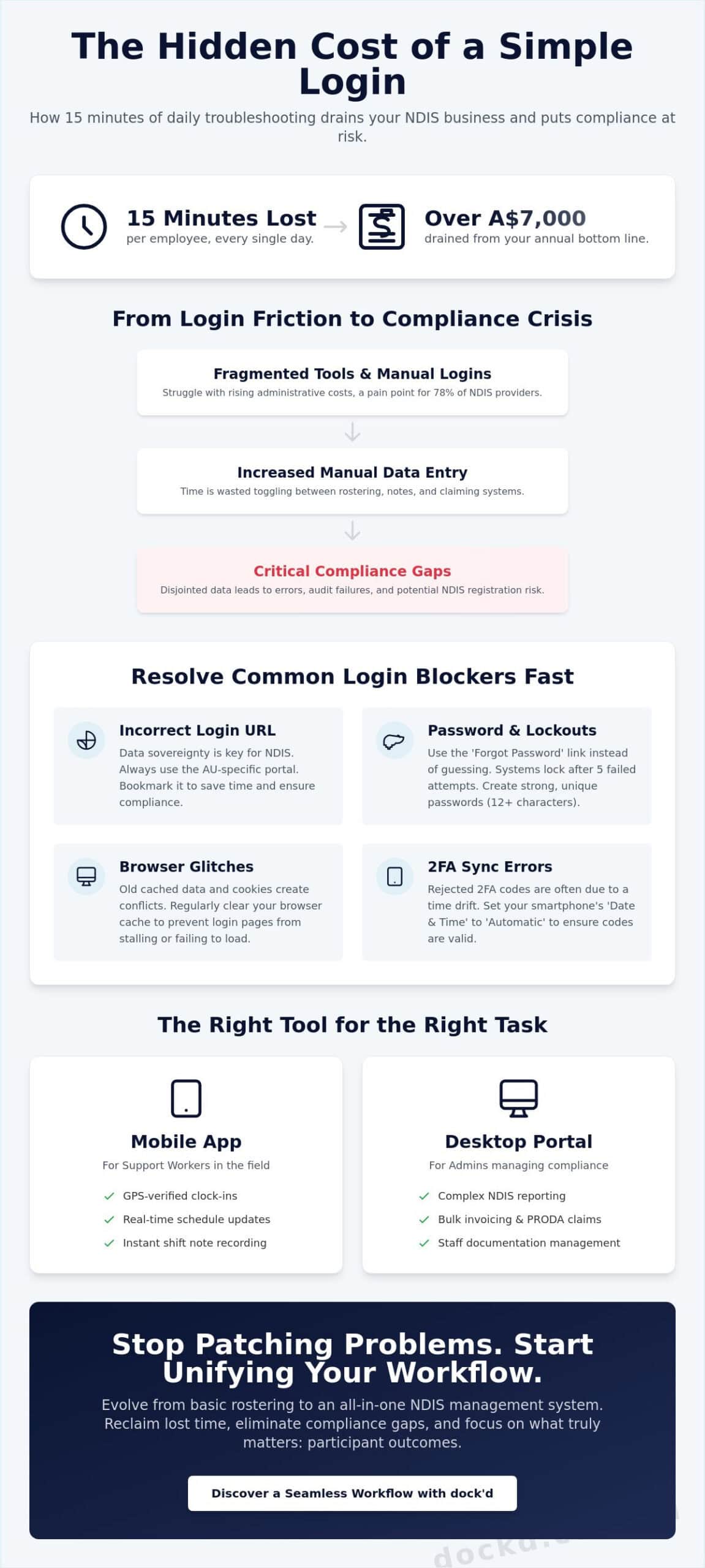
What if the 15 minutes your team spends troubleshooting a shift care login every day is actually draining over A$7,000 from your annual bottom line? The 2023 State of the Disability Sector report highlighted that 78% of providers struggle with rising administrative costs, and technical friction only adds to that burden. You want to focus on participant outcomes, not on manual data entry between your roster and your claims. We understand that fragmented tools don’t just cause headaches; they create compliance gaps that can put your NDIS registration at risk.
Accessing your account should be the easiest part of your day, acting as a gateway to a more efficient, high-tech operation. This guide helps you reclaim those lost hours by streamlining your access and synchronising your entire workflow. We’ll show you how to bypass common errors and integrate your scheduling directly with your invoicing to unlock a truly seamless NDIS management experience. It’s time to spend less time on paperwork and more time delivering the high-quality care your participants deserve.
Key Takeaways
- Locate your correct shift care login URL for the Australian region and access the mobile app for immediate roster updates.
- Resolve common login blockers quickly, from password recovery to clearing browser cache conflicts that stall your workflow.
- Organise your dashboard for maximum visibility and automate alerts to handle shift cancellations without the manual stress.
- Bridge the compliance gap by evolving from basic rostering to a unified NDIS system that simplifies PRODA claiming.
- Unlock a more efficient operation with an Australian-made solution designed to make your NDIS management truly seamless.
Finding Your ShiftCare Login Portal
Access your workspace instantly. Your shift care login is the starting point for every productive day. For Australian providers, hitting the right URL ensures your data remains compliant and your workflow stays smooth. Don’t let a simple redirect slow you down. Bookmark the AU-specific portal to skip the search and get straight to your dashboard. This small habit saves approximately 15 minutes of administrative drift every week.
Efficiency on the water requires the right tools, and managing disability support is no different. You need a secure gateway that connects you to your team and your participants without friction. Whether you are in the office or out in the field, knowing exactly where to enter your credentials is the first step toward mastering your NDIS obligations.
Regional Login Variations
Australian NDIS data is highly sensitive. Using the AU-specific portal is a requirement for data sovereignty. When you use the correct Australian link, you ensure that participant information stays within local jurisdictions. This is vital for maintaining the standards set by the National Disability Insurance Scheme (NDIS). Always check your browser’s address bar for the “au” prefix before entering your details.
Browser settings can sometimes lead to frustration. Some browsers automatically redirect users to global or US-based servers based on previous search history. To prevent this, clear your cache or manually type the full Australian URL. Verify you are on a secure connection by looking for the padlock icon next to the URL. This encrypted link protects your shift care login credentials from external threats. A secure connection is your first line of defence in a tech-forward organisation.
Mobile App vs Desktop Access
Support workers on the move require the mobile app for real-time updates. It allows for instant shift notes and GPS-verified check-ins. This app is designed for speed and ease of use while providing care. Admins handling the heavy lifting of compliance and payroll should stick to the desktop version. The desktop portal offers the screen real estate needed for complex NDIS reporting and detailed staff scheduling. It provides a high-level overview that a mobile screen simply cannot match.
- Mobile App: Best for clocking in, viewing daily schedules, and recording immediate client feedback.
- Desktop Portal: Ideal for bulk invoicing, auditing NDIS plans, and managing staff documentation.
- Syncing: Always ensure your app is updated to the latest version to avoid data gaps.
Syncing issues usually stem from outdated software or poor connectivity. If your mobile login does not match your desktop session, log out of both devices immediately. Refresh your browser and restart the app. This simple reset usually forces the database to align your permissions and updates your dashboard. Keeping your software current ensures a seamless transition between the office and the field.
Troubleshooting Common Login Issues
Hitting a digital roadblock shouldn’t stall your day. If your shift care login fails, stay calm. Most access issues stem from minor sync errors or outdated credentials. Security is paramount when handling participant data. Systems often trigger an account lockout after five consecutive failed attempts. This protective measure prevents unauthorised access, keeping your operations in line with the NDIS Practice Standards. If you’re locked out, wait 30 minutes before trying again or contact your system administrator to reset the counter.
Two-factor authentication (2FA) adds a critical layer of safety. Problems here usually involve time-sync issues on your mobile device. If your 2FA code is rejected, check your smartphone settings. Ensure your “Date & Time” is set to “Automatic.” Even a 30-second drift from the network time can invalidate your security token, preventing a successful entry.
Resetting Your Credentials Safely
Don’t guess your password. If you’ve forgotten it, use the recovery link immediately. First, verify your registered email address. Use the exact one associated with your NDIS provider account. Check your spam or “Promotions” folder if the reset link doesn’t arrive within 120 seconds. Once the email lands, click the link to create a new password. Modern NDIS data standards require complexity. Aim for at least 12 characters, including a mix of symbols and numbers. This keeps participant records secure and your workflow seamless. Just as you’d find your spot on the water, securing your digital space ensures a smooth journey for your team.
Technical Glitches and Browser Fixes
Your browser might be the culprit. Over time, cached data and old cookies create conflicts. This leads to buttons not clicking or pages failing to load properly. Open an “Incognito” or “Private” window to test the shift care login screen. If it works there, clear your browser cache for the last 24 hours. Keep your software current. Security patches in the latest browser versions are non-negotiable for maintaining a secure environment. Disable active ad-blockers or script-heavy extensions. These often mistake login pop-ups for intrusive ads, breaking the authentication flow. Switch them off, refresh the page, and get back to your schedule.
Maximising Efficiency After You Log In
Once you complete your shift care login, your dashboard becomes the command centre for your day. Efficiency starts with visibility. Organise your dashboard to prioritise immediate rosters. This ensures you see client needs before you even leave the house. A clean interface prevents the mental clutter of searching for addresses or contact details under pressure.
Set up automated alerts for shift changes. Cancellations happen. Real-time notifications mean you don’t waste time travelling to a cancelled appointment. This keeps your workflow flexible and responsive. Use the filtering tools to sort shifts by location or support type. This simple step reduces travel time and helps you group appointments logically. You’re not just working; you’re navigating your day with precision.
Streamlining Daily Rosters
Avoid double-bookings by viewing your entire week at a glance. The platform provides a clear visual map of your commitments. Customise your notifications to receive instant updates on client profiles. If a client’s needs change at 8:00 AM, you’ll know by 8:01 AM. You stay informed without constantly refreshing your browser. It’s about having the right information exactly when you need it.
Filter your shifts by suburb or specific care requirements. This allows for better route planning. You’ll save fuel and arrive at each site ready to focus on the participant. It’s a tech-forward way to manage a busy schedule. This level of organisation transforms a chaotic morning into a smooth, manageable journey across your service area.
Digital Care Notes and Compliance
Capturing notes immediately after a shift is vital for NDIS compliance. Don’t wait until the end of the day. Memories fade, and small but critical details get lost. High-quality documentation is the backbone of successful audits. By logging notes on-site, you ensure accuracy and meet the NDIS Practice Standards for record-keeping and operational management. This proactive approach eliminates the stress of last-minute reporting.
Linking shift data directly to established NDIS practice standards simplifies your reporting. It turns a complex administrative task into a routine part of your workflow. Digital notes also protect client privacy. Physical paper files are easily lost or damaged; secure digital logs keep sensitive information confidential and accessible only to authorised personnel.
Real-time clock-in and clock-out data provides the ultimate transparency. It builds trust with participants and ensures you’re paid accurately for every minute worked. This data isn’t just for payroll. It’s a digital footprint that proves service delivery during NDIS reviews. Your shift care login is the first step toward a more professional, compliant, and adventurous career in disability support.
Why Providers Look Beyond Basic Shift Management
Your daily shift care login gets the team moving. It handles the basics of who goes where and when. But simple rostering creates a massive compliance gap in the Australian market. NDIS providers face strict reporting rules that a basic calendar cannot satisfy. A roster isn’t an audit trail. You need to prove outcomes, not just attendance. This shift toward person centred care requires data that follows the participant, not just the staff member. Modern businesses need a system that captures progress notes, goals, and incident reports in one motion.
Managing three or four different subscriptions drains your A$ margin. It also creates silos. When your rostering tool doesn’t talk to your invoicing tool, you’re forced to bridge the gap with manual entry. This is where the friction starts. You didn’t start a care business to become a data entry clerk. Moving toward a unified system removes the administrative weight and lets you focus on the water ahead.
The Problem with Fragmented Systems
Manual invoicing is a profit killer. Research shows that manual data entry causes up to 25% of claiming errors in small to medium enterprises. These errors lead to rejected NDIS claims and delayed payments, choking your cash flow. It’s a cycle of frustration. You spend hours fixing mistakes that shouldn’t exist. There is also a major security risk. Moving sensitive participant info between non-integrated apps increases the chance of a data breach. With the average cost of a data breach in Australia reaching A$4.84 million in 2023, the stakes are too high. All-in-one platforms are now the gold standard for security and efficiency.
Scaling Your NDIS Business
Growth hits a wall when your tools don’t talk. If you’re spending 15 hours a week on manual data transfer, you aren’t scaling; you’re just surviving. Recognising when your current shift care login process is holding you back is the first step toward growth. Integrated NDIS software for providers solves this by creating a single source of truth. It prepares you for NDIS mid-term audits by keeping every record in one secure vault. Unified data helps you:
- Automate NDIS bulk claims with 100% accuracy.
- Track participant goals against actual support hours.
- Generate instant reports for the Quality and Safeguards Commission.
- Reduce overhead costs by cutting multiple software subscriptions.
Don’t let fragmented systems anchor your business. Simplify your operations and regain your freedom today. Explore the Dockd platform to see how we streamline complex workflows.
Unlocking a Unified Workflow with dock’d
Managing your shift care login is a daily necessity, but your business needs more than just access; it needs a command centre. dock’d streamlines your NDIS operations from initial rostering through to complex PRODA claiming. We’ve built an Australian-made platform that understands the specific demands of local compliance. Our software automatically updates with the NDIS Price Guide, ensuring you never miss a rate change or billing rule. It’s about giving you the freedom to focus on care while we handle the technical heavy lifting.
The dock’d Support Worker App is the essential tool for the modern mariner of care. It provides your team with a secure, high-tech interface to log hours, track progress notes, and manage their schedules on the go. By removing the friction of manual paperwork, you empower your crew to deliver better outcomes for participants. We’ve replaced clunky, outdated systems with a fast-paced digital experience that feels as intuitive as your favourite mobile apps. It’s about movement, efficiency, and reliability on the front lines.
Simplified NDIS Financials
Stop wasting your weekends on manual data entry. Automating your accounting invoicing can save your administration team upwards of 12 hours every week. Our platform features a direct Xero integration for real-time revenue tracking, allowing you to see your financial health at a glance. Whether you’re managing complex Supported Independent Living (SIL) modules or high-volume Support Coordination, dock’d handles the calculations with precision. We ensure every line item meets NDIS standards, reducing the risk of rejected claims and improving your cash flow instantly. It’s financial management that moves at the speed of your business.
Ready to Upgrade Your Experience?
Transitioning to a new system shouldn’t feel like a storm at sea. If your current shift care login feels like a bottleneck, our data migration process is designed to be seamless. We move your participant records and staff details from your current software without downtime. We provide dedicated training and support tailored specifically for Australian support teams. You’ll work with locals who understand the NDIS landscape as well as you do. Don’t let inefficient processes hold your vessel back from growing. Book a demo with dock’d today and discover how a unified workflow can transform your service delivery.
Navigate Your NDIS Operations With Precision
Mastering your shift care login is the first step toward a functional workday. You’ve learned how to find your portal, fix common access hurdles, and use basic tools to track support hours. Keeping your business afloat in a complex regulatory environment requires more than just a login screen. Real growth happens when you move beyond basic scheduling and embrace a system designed specifically for the Australian market.
Efficiency shouldn’t be a struggle. dock’d is 100% Australian owned and operated, providing a high-tech marketplace feel for NDIS providers who value reliability. Our platform is built specifically for NDIS compliance to protect your registration. We make the switch easy with seamless data migration from legacy systems, so your team stays focused on care rather than paperwork. It’s time to unlock a more professional way to manage your daily operations.
Discover the dock’d difference: Your NDIS management, simplified.
Set your sights on a more streamlined future and start exploring what a unified workflow can do for your team today.
Frequently Asked Questions
How do I recover my ShiftCare password if I am locked out?
Reset your password by clicking the Forgot Password link on the shift care login screen. You’ll receive a secure link via email to create a new credential immediately. This process ensures you regain access to your dashboard without compromising sensitive participant data. If the email doesn’t arrive within 120 seconds, check your junk folder to keep your workflow moving.
Can I use the ShiftCare login on multiple devices simultaneously?
You can access your account on multiple devices at the same time. The platform syncs data across the mobile app and desktop browser in real-time. This flexibility allows office staff to manage rosters while field workers log progress notes on-site. It’s a seamless way to stay connected to your team regardless of your physical location.
What should I do if the ShiftCare login page is not loading?
Clear your browser cache or check your internet connection if the page fails to load. Most loading issues stem from outdated browser data or temporary network drops. If the problem persists after 60 seconds, verify the system status on the official support page. Using a modern browser like Chrome or Edge ensures the best performance for your NDIS management.
Is my data secure when I log in to an NDIS management app?
Your data remains secure through enterprise-grade AES-256 encryption and Australian-based servers. These protocols meet the strict privacy requirements set by the NDIS Quality and Safeguards Commission. By hosting data locally, the platform ensures fast access and compliance with the Privacy Act 1988. Security is the anchor of every digital transaction you make.
How does dock’d compare to other shift management logins?
Dockd focuses on simplifying the maritime experience, while ShiftCare targets the NDIS sector. Both platforms prioritise a seamless user journey and secure authentication to remove friction from daily operations. Whether you’re managing a vessel or a care team, the goal is the same. You want to spend less time on paperwork and more time on the water or with your clients.
Does the ShiftCare login support two-factor authentication?
The shift care login supports two-factor authentication to add an extra layer of protection to your account. You’ll enter your password and then verify your identity via a unique code sent to your mobile device. This 2-step process prevents unauthorised access even if someone discovers your primary password. It’s a vital tool for maintaining NDIS data integrity and protecting participant privacy.
Why am I being redirected to the US login page instead of Australia?
Check your URL or VPN settings if you’re being sent to the US login page. Browsers sometimes default to global domains based on your IP address. Ensure you’re using the Australian-specific portal to access your local NDIS data and regional settings. Correcting this ensures your payroll and compliance features align with Australian tax laws and NDIS standards.
How often should I update my login credentials for NDIS compliance?
Update your login credentials every 90 days to maintain high security standards for NDIS compliance. Frequent password changes reduce the risk of long-term account compromises. While the NDIS doesn’t mandate a specific timeframe, the Australian Cyber Security Centre recommends regular updates for systems handling sensitive health information. Keeping your keys fresh keeps your data safe and your business secure.